





AI TOOLS Reference Guide
Your Creative and Productivity Partner
Work Smarter | Create Faster | Build a Better Future
Prepared by Ismail and Associates | Global Resource Hub | October 2026
1. Overview
This guide organizes 85 AI tool listings (71 distinct tools) into seven practical categories: images and design, charts and diagrams, website and app creation, video and presentation, writing and content, productivity and business, and special purposes such as accounting, tax, research and learning. Each entry shows the tool name and its primary use. A companion Excel workbook contains the same data in a searchable, filterable directory.
2. Categories at a Glance
| No. | Category | Tools | Focus |
| 1 | AI Image and Design Tools | 20 | Create stunning images, graphics, logos and visual content |
| 2 | AI for Charts, Diagrams and Business Graphics | 15 | Visualize your ideas, data and processes |
| 3 | AI for Website and App Creation | 10 | Build websites, landing pages and web apps with AI |
| 4 | AI for Video and Presentation | 10 | Create engaging videos, animations and presentations |
| 5 | AI for Writing and Content | 10 | Create high-quality text, copy and documents |
| 6 | AI for Productivity and Business | 10 | Manage your work, automate tasks and save time |
| 7 | AI for Special Purposes | 10 | Finance, research, learning and more |
Total listings: 85 Distinct tools: 71
Category 1: AI Image and Design Tools
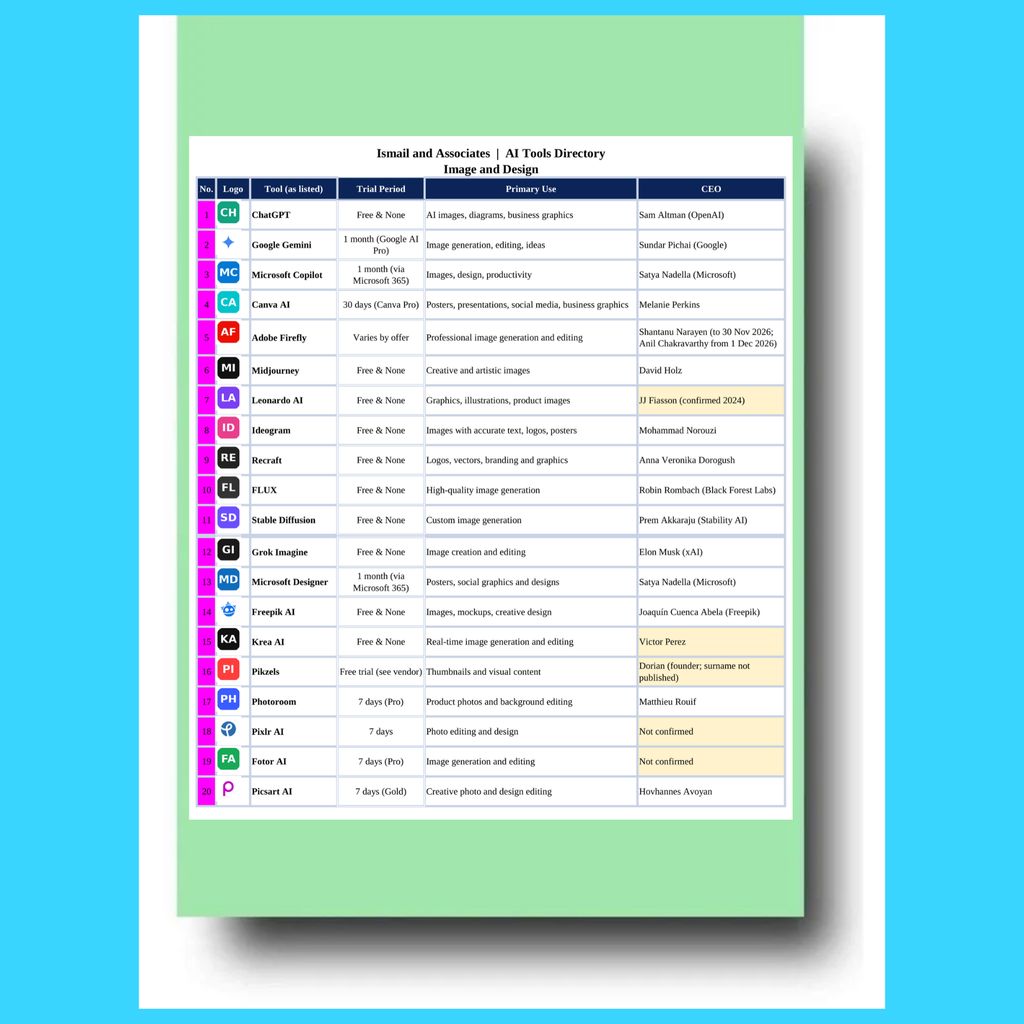
Create stunning images, graphics, logos and visual content.
| No. | Tool | Primary Use |
| 1 | ChatGPT | AI images, diagrams, business graphics |
| 2 | Google Gemini | Image generation, editing, ideas |
| 3 | Microsoft Copilot | Images, design, productivity |
| 4 | Canva AI | Posters, presentations, social media, business graphics |
| 5 | Adobe Firefly | Professional image generation and editing |
| 6 | Midjourney | Creative and artistic images |
| 7 | Leonardo AI | Graphics, illustrations, product images |
| 8 | Ideogram | Images with accurate text, logos, posters |
| 9 | Recraft | Logos, vectors, branding and graphics |
| 10 | FLUX | High-quality image generation |
| 11 | Stable Diffusion | Custom image generation |
| 12 | Grok Imagine | Image creation and editing |
| 13 | Microsoft Designer | Posters, social graphics and designs |
| 14 | Freepik AI | Images, mockups, creative design |
| 15 | Krea AI | Real-time image generation and editing |
| 16 | Pikzels | Thumbnails and visual content |
| 17 | Photoroom | Product photos and background editing |
| 18 | Pixlr AI | Photo editing and design |
| 19 | Fotor AI | Image generation and editing |
| 20 | Picsart AI | Creative photo and design editing |
Category 2: AI for Charts, Diagrams and Business Graphics
Visualize your ideas, data and processes.
| No. | Tool | Primary Use |
| 1 | Canva | Presentations, infographics, charts |
| 2 | ChatGPT | Diagrams and visual content |
| 3 | Gemini | Charts and visualization |
| 4 | Copilot | Diagrams and productivity |
| 5 | Napkin AI | Simple diagrams and flowcharts |
| 6 | Lucidchart AI | Flowcharts and process maps |
| 7 | Miro AI | Brainstorming and whiteboards |
| 8 | Whimsical AI | Diagrams and flowcharts |
| 9 | FigJam AI | Collaborative diagrams |
| 10 | Gamma | Presentations and visuals |
| 11 | Beautiful.ai | Slides and infographics |
| 12 | Visme | Charts and infographics |
| 13 | Infogram | Data visualization |
| 14 | Piktochart | Infographics and presentations |
| 15 | Canva | Templates and visual design |
Category 3: AI for Website and App Creation
Build websites, landing pages and web apps with AI.
| No. | Tool | Primary Use |
| 1 | Lovable | AI website and app builder |
| 2 | Bolt.new | Web and app development |
| 3 | v0 | AI interface and web development |
| 4 | Replit | AI-assisted development |
| 5 | Framer AI | Website creation |
| 6 | Wix AI | Website creation and design |
| 7 | Durable | AI business websites |
| 8 | Hostinger AI | Website and content assistance |
| 9 | Jimdo | Simple websites for business |
| 10 | WordPress + AI | Flexible and scalable websites |
Category 4: AI for Video and Presentation
Create engaging videos, animations and presentations.
| No. | Tool | Primary Use |
| 1 | Runway | Video generation and editing |
| 2 | Kling AI | Short video creation |
| 3 | Pika | AI video creation |
| 4 | HeyGen | AI avatars and video |
| 5 | Synthesia | AI video creator |
| 6 | Gamma | Presentations and videos |
| 7 | Beautiful.ai | Slides and video presentations |
| 8 | Canva | Video and animations |
| 9 | Adobe Firefly | Video and motion graphics |
| 10 | InVideo | Video editing and templates |
Category 5: AI for Writing and Content
Create high-quality text, copy and documents.
| No. | Tool | Primary Use |
| 1 | ChatGPT | Articles, emails, reports |
| 2 | Gemini | Research and content ideas |
| 3 | Copilot | Writing and productivity |
| 4 | Claude | Long-form content |
| 5 | Jasper | Marketing copy and blogs |
| 6 | Writesonic | SEO content and ads |
| 7 | Rytr | Blog posts and copywriting |
| 8 | Grammarly | Proofreading and editing |
| 9 | QuillBot | Paraphrasing and summarizing |
| 10 | Wordtune | Rewrite and improve text |
Category 6: AI for Productivity and Business
Manage your work, automate tasks and save time.
| No. | Tool | Primary Use |
| 1 | Microsoft Copilot | Office and business productivity |
| 2 | Notion AI | Notes, docs and project management |
| 3 | ClickUp AI | Tasks and workflow |
| 4 | Zapier | Automation and integrations |
| 5 | Make | Visual automation |
| 6 | Dext | Accounting and bookkeeping |
| 7 | Hubdoc | Document capture |
| 8 | n8n | Workflow automation |
| 9 | Microsoft 365 | Docs, email and collaboration |
| 10 | Google Workspace | Docs, sheets and collaboration |
Category 7: AI for Special Purposes
Finance, research, learning and more.
| No. | Tool | Primary Use |
| 1 | QuickBooks AI | Accounting and finance |
| 2 | Xero | Cloud accounting |
| 3 | TurboTax | Tax filing (USA) |
| 4 | ProConnect | Tax preparation |
| 5 | TaxCalc | Tax and compliance (UK) |
| 6 | Perplexity | Research and answers |
| 7 | Claude | Deep research |
| 8 | DeepL | Translation |
| 9 | Duolingo | Language learning |
| 10 | Khan Academy | Education and learning |
3. Tools Listed in More Than One Category
Several platforms are strong across multiple workflows. Names are grouped by product, so “Copilot” and “Microsoft Copilot” are treated as one tool, as are “Canva” and “Canva AI”.
| Tool | Categories | Listings |
| Microsoft Copilot | 1. Image and Design; 2. Charts and Diagrams; 5. Writing and Content; 6. Productivity and Business | 4 |
| Canva | 1. Image and Design; 2. Charts and Diagrams; 4. Video and Presentation | 4 |
| ChatGPT | 1. Image and Design; 2. Charts and Diagrams; 5. Writing and Content | 3 |
| Gemini | 1. Image and Design; 2. Charts and Diagrams; 5. Writing and Content | 3 |
| Adobe Firefly | 1. Image and Design; 4. Video and Presentation | 2 |
| Beautiful.ai | 2. Charts and Diagrams; 4. Video and Presentation | 2 |
| Claude | 5. Writing and Content; 7. Special Purposes | 2 |
| Gamma | 2. Charts and Diagrams; 4. Video and Presentation | 2 |
4. Notes for Accounting, Tax and Advisory Practice
- Bookkeeping and accounting: Dext and Hubdoc (document capture, bookkeeping), QuickBooks AI and Xero (cloud accounting) are the most directly relevant listings.
- Tax tools are jurisdiction-specific: TurboTax and ProConnect are listed for the USA and TaxCalc for the UK. They do not cover Bangladesh income tax or VAT rules.
- Reporting and presentation: Gamma, Beautiful.ai, Canva, Infogram and Visme can turn financial analysis into board-ready slides and infographics.
- Research and drafting: ChatGPT, Gemini, Claude and Perplexity can assist with research and first drafts. Outputs should be verified against primary sources, such as the National Board of Revenue circulars and statutory rules, before reliance.
- Client confidentiality: Review each tool’s data handling terms before uploading client financial statements, tax returns or other confidential records.
Source and disclaimer: Tool names and descriptions are compiled from the “AI Tools – Your Creative and Productivity Partner” infographic. Features, pricing and availability change frequently; confirm current details with each provider before adoption.
RELATED POSTS
View all