


ISMAIL AND ASSOCIATES
Chartered Accountancy • Tax • VAT • Audit • Corporate Advisory
A Complete Guide to Cloud Accounting Software
A Complete Guide to Modern, Real-Time Financial Management for Growing Businesses
Financial management has moved decisively out of filing cabinets and desktop hard drives and into the cloud. For business owners, finance teams, and decision-makers across Bangladesh and beyond, cloud accounting software is no longer an emerging trend — it is fast becoming the standard for how organisations record transactions, monitor cash flow, and make informed financial decisions. This guide explains what cloud accounting software is, the benefits it offers, how it compares to traditional systems, and how to move your organisation to the cloud with confidence.
1. What Is Cloud Accounting Software?
Cloud accounting software is a financial management system hosted on remote servers rather than installed on a single office computer. Instead of storing data locally, all transactions, invoices, reports, and financial records are processed and saved on secure, internet-connected servers maintained by the software provider.
This means your books are accessible from any device with an internet connection — a desktop in the office, a laptop at home, or a smartphone while visiting a client or factory floor — with every user always looking at the same, current set of figures.
How Cloud Accounting Works
- Data entry and storage: Invoices, bills, receipts, and bank transactions are entered or imported directly into the system and stored on the provider’s secure servers.
- Automatic bank feeds: Most platforms connect directly to bank and mobile financial service accounts, pulling in transactions daily and reducing manual entry.
- Real-time synchronisation: Every authorised user — owner, accountant, bookkeeper, or auditor — sees the same live data the moment it is entered, from wherever they are.
- Automatic updates: The software provider manages upgrades, security patches, and regulatory updates centrally, so users always work on the latest version without manual installation.
2. Clarifying the Terms: Cloud, Cloud Software, and Cloud Accounting
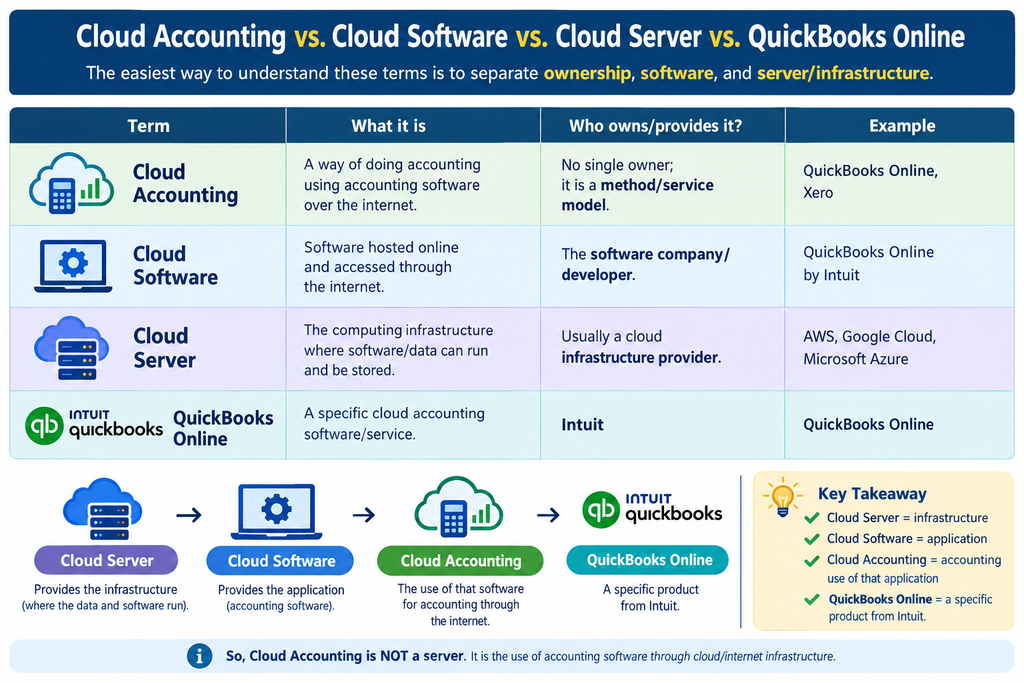
A common point of confusion is whether “cloud accounting” is itself a server. It is not. The easiest way to understand these terms is to separate ownership, software, and infrastructure.
| Term | What It Is | Who Owns / Provides It | Example |
| Cloud Accounting | A way of doing accounting using accounting software over the internet | No single owner; it is a method / service model | QuickBooks Online, Xero |
| Cloud Software | Software hosted online and accessed through the internet | The software company / developer | QuickBooks Online by Intuit |
| Cloud Server | The computing infrastructure where software and data run and are stored | Usually a cloud infrastructure provider | AWS, Google Cloud, Microsoft Azure |
| QuickBooks Online | A specific cloud accounting software / service | Intuit | QuickBooks Online |
The Simple Relationship
Cloud Server → hosts the software → Cloud Software → provides accounting functions → Cloud Accounting
For example: Intuit provides QuickBooks Online, an accounting software and service. It runs on cloud infrastructure — Intuit states that it uses public cloud providers such as Amazon Web Services (AWS) and Google Cloud Platform (GCP) for most of the systems, networks, and databases supporting its online offerings. Users then access it through the internet.
| Important Clarification Cloud Accounting is not a server. It is the use of accounting software through cloud / internet infrastructure; the server sits underneath it. QuickBooks Online is not the cloud server — it is an online accounting solution provided by Intuit. Intuit’s own terms identify QuickBooks Online as an online solution for accounting and business tasks. One-line formula: Cloud Server = infrastructure → Cloud Software = application → Cloud Accounting = accounting use of that application → QuickBooks Online = a specific product from Intuit. |
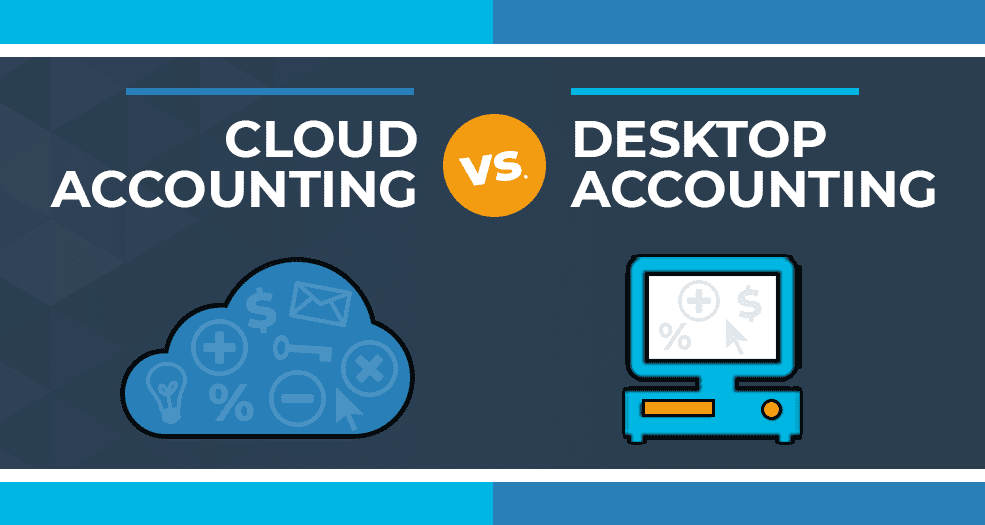
3. Cloud vs. Server vs. Desktop Accounting
If the question is whether cloud accounting software needs a physical server at your office, the short answer is: generally, no. The provider hosts the server infrastructure remotely, and you access the software over the internet.
Quick Reference
| Feature | Cloud Accounting | Server / Local Accounting |
| Installation | Usually no local server required | Requires server / computer |
| Data storage | Cloud / data-center | Local server |
| Internet | Usually required | Often works without internet |
| Access | From anywhere | Usually office / network access |
| Multiple users | Easy to support | Requires network / server setup |
| Backup | Usually handled by provider | Usually your responsibility |
| Examples | QuickBooks Online, Xero, Zoho Books | Tally on local server, Sage desktop |
Cloud, Server, and Desktop — Explained Simply
- Cloud Accounting: using accounting software through the internet; the data lives on the provider’s cloud server. If you log in from home or from the office, you see the same data. Bottom line: Software + Cloud Server + Internet. Examples: QuickBooks Online, Xero, Zoho Books.
- Server Accounting: the accounting software and database usually sit on a central office server (Office Server → Accounting Database → Office computers), and multiple computers can use the same server’s data. Bottom line: Software + Local / Private Server + Network. Even without internet, many such systems can keep working as long as the office network is up.
- Desktop Accounting: the accounting software is installed on one specific computer (Your PC → Accounting Software → Data). Working from a different computer usually requires a separate setup or network. Bottom line: Software + Individual Computer.
Detailed Comparison
| Aspect | Cloud Accounting | Server Accounting | Desktop Accounting |
| Where is the software? | Cloud | Server | Computer |
| Where is the data? | Cloud | Office / private server | Computer |
| Internet needed? | Usually required | Not always | Not always |
| Access from anywhere | Yes | Limited / setup needed | Usually not |
| Multiple users | Easy | Possible | Limited |
| Local server required | No | Yes | No |
| Examples | QuickBooks Online, Xero | Server-based ERP / accounting | Desktop accounting software |
| Most Important Point Cloud itself is not accounting software. Cloud is where the software and data are hosted; accounting software is what you actually use to keep the books. Since QuickBooks Online and Xero are cloud accounting software, calling them a “cloud server” would not be accurate. |
4. Key Benefits of Cloud Accounting
- Anywhere, anytime access: business owners and finance staff can review cash position, outstanding invoices, or expense reports from any location — especially valuable for organisations managing multiple factory units, branch offices, or field operations.
- Real-time financial visibility: because data updates continuously rather than at month-end, management can see an accurate financial picture at any moment, supporting faster, better-informed decisions on pricing, purchasing, and cash management.
- Lower total cost of ownership: cloud platforms typically run on a monthly subscription rather than a large upfront licence fee, and remove the need for in-house servers, IT maintenance, and manual backup infrastructure.
- Stronger data security and backup: reputable cloud providers use bank-grade encryption, redundant data centres, and automatic daily backups — protections that are difficult and expensive for a small or mid-sized business to replicate on its own hardware.
- Easier collaboration with your accountant: your accounting firm can be granted secure, role-based access to your live books, enabling faster turnaround on VAT returns, income tax filings, management accounts, and audit queries without exchanging files back and forth.
- Built for growth: adding new users, branches, currencies, or business modules is typically a matter of adjusting a subscription plan, rather than purchasing and installing new infrastructure.
5. Traditional Accounting vs. Cloud Accounting
| Aspect | Traditional / Desktop | Cloud Accounting |
| Data access | Single computer or local network only | Any device, any location, 24/7 |
| Updates | Manual installation, often delayed | Automatic, applied centrally |
| Backup and recovery | Manual; risk of local data loss | Automatic, redundant, provider-managed |
| Collaboration | File sharing, version conflicts | Simultaneous, role-based, real-time |
| Upfront cost | High licence and hardware cost | Low-cost monthly or annual subscription |
| Scalability | Requires new licences / hardware | Scales with a plan or module change |
6. Essential Features to Look For
- Bank and mobile financial service integration — direct feeds to reduce manual data entry.
- VAT and income tax compliance tools — built-in or add-on support for NBR-compliant VAT returns and tax reporting.
- Multi-user, role-based access — control over who can view, enter, or approve transactions.
- Inventory and production tracking — particularly important for manufacturing and RMG / textile operations.
- Multi-currency support — essential for exporters and businesses with foreign buyers or suppliers.
- Custom reporting and dashboards — management accounts, cash flow forecasts, and board-ready reports on demand.
- Audit trail — a time-stamped record of every entry and edit, supporting statutory audit and internal control.
- Data security certification — encryption in transit and at rest, and clear data-residency and backup policies.
7. Is Cloud Accounting Right for Your Business?
Cloud accounting suits the great majority of small and mid-sized organisations, but a few practical points deserve consideration before migrating:
- Internet reliability: a stable connection is needed for uninterrupted daily use; most platforms also offer limited offline functionality.
- Staff readiness: a short training period helps bookkeeping and finance staff adjust to a new interface and workflow.
- Data privacy obligations: confirm the provider’s data-handling practices align with your confidentiality and regulatory obligations.
- Integration needs: check compatibility with existing systems such as payroll, inventory, or e-commerce platforms.
8. Steps to Transition to Cloud Accounting
- Assess current processes: map existing workflows, chart of accounts, and reporting needs before selecting a platform.
- Choose the right software: shortlist platforms against your industry, size, compliance, and budget requirements.
- Plan the data migration: clean up historical data and decide on a cut-over date, often the start of a financial period.
- Configure and customise: set up the chart of accounts, tax rates, user roles, and approval workflows.
- Train the team: provide hands-on training to bookkeeping, finance, and management users.
- Run a parallel period: operate the new and old systems side by side briefly to confirm accuracy before full cut-over.
- Review and optimise: revisit reports, dashboards, and integrations after go-live to refine the setup.
9. Common Challenges and How to Overcome Them
- Resistance to change: address it with clear communication of benefits and structured, hands-on training.
- Data migration errors: mitigate with a careful reconciliation of opening balances before going live.
- Over-reliance on internet connectivity: select a provider with reliable offline or mobile-data fallback options.
- Choosing the wrong platform: avoid this with an independent needs assessment before committing to a subscription.
10. How Ismail and Associates Can Help
Ismail and Associates advises businesses on selecting, implementing, and maintaining cloud accounting systems that stay compliant with Bangladesh VAT and income tax requirements. From initial platform selection through data migration, staff training, and ongoing VAT and tax filing support, our team helps you make the move to cloud accounting smoothly and confidently.
| Get in Touch Contact Ismail and Associates to discuss the right cloud accounting solution for your business. |
RELATED POSTS
View all


Official Address and Google Map of Ismail and Associates.
July 26, 2026 | by Mohmmed Ismail Miah
Bangladesh Salary Tax Deduction at Source (TDS) 2026 – Finance Act 2026
July 25, 2026 | by Mohmmed Ismail Miah