



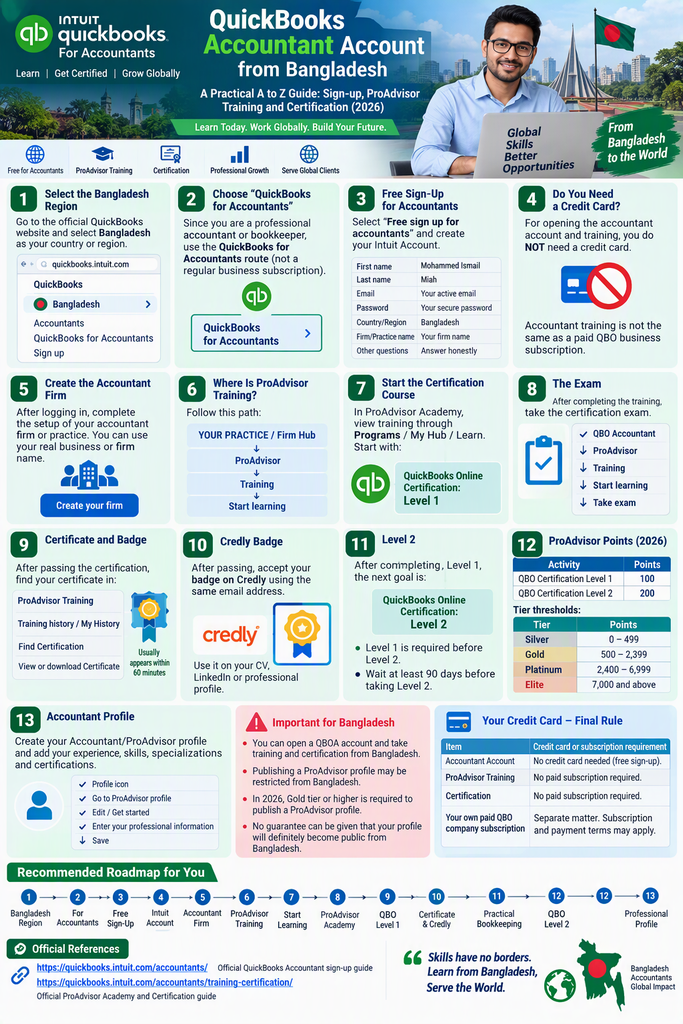

QuickBooks Accountant Account from Bangladesh
A practical A to Z guide: sign-up, ProAdvisor training and certification (2026)
This guide is based on Intuit’s current 2026 instructions and walks through the process of working from Bangladesh. The key change to note is that Intuit is moving towards the Intuit Accountant Suite (IAS); however, the QuickBooks Online Accountant (QBOA) and ProAdvisor training and certification workflow is still in use.
Step 1: Select the Bangladesh Region
First, go to the official QuickBooks website and select Bangladesh as your country or region. According to Intuit’s Bangladesh-specific guidance, the route is:
QuickBooks → Bangladesh → Accountants → QuickBooks for Accountants → Sign up
This is the route shown in Intuit’s published guidance for Bangladesh.
Step 2: Choose “QuickBooks for Accountants”
Since your purpose is to learn QuickBooks as a professional accountant or bookkeeper, do not start with a regular QuickBooks Online business subscription. Use the QuickBooks for Accountants route first. Intuit’s current instructions also describe creating a firm through the free accountant sign-up.
Step 3: Free Sign-Up for Accountants
Select Free sign up for accountants. Your Intuit Account will then be created, and you will move on to setting up your accountant firm or profile.
What information should you provide?
Use your own accurate details:
| Field | What to enter |
| First name | Mohammed Ismail |
| Last name | Miah |
| Your own active email address | |
| Password | Your own secure password |
| Country/Region | Bangladesh |
| Firm/Practice name | The actual name of your professional firm |
| Other questions | Answer according to your real professional status |
Important: Do not use false information, as identity or profile verification may be carried out later.
Step 4: Do You Need to Provide a Credit Card?
For opening the accountant account
If your first goal is Account → Accountant firm → Training → Certification, you do not need to provide a credit card, because no regular QBO business subscription is being purchased.
According to Intuit’s current documentation, the Accountant Suite or accountant account is used for supporting client books, training, and ProAdvisor benefits.
Separate matter: If you later want to buy a paid QuickBooks Online business subscription for yourself, that is a separate subscription and billing process.
In other words: Accountant training is not the same as your own paid QBO company subscription. Do not mix the two.
Step 5: Create the Accountant Firm
After logging in, complete the setup of your accountant firm or practice. Under Intuit’s current instructions, a firm can be created even if you already have an Intuit ID, and it is also possible to create a separate new professional profile.
In your case, you may use your real business or firm name as the firm name, provided it is the name of your professional practice.
Step 6: Where Is ProAdvisor Training?
After entering the accountant account, follow this path:
YOUR PRACTICE / Firm Hub → ProAdvisor → Training → Start learning
ProAdvisor Academy will then open in a new tab. Intuit’s current instructions give this exact workflow.
Step 7: Start the Certification Course
In ProAdvisor Academy, you can view training through Programs / My Hub / Learn. Your first goal should be:
QuickBooks Online Certification: Level 1
After completing the training, you can take the certification exam. According to Intuit’s current FAQ, training is optional; if you are eligible, you can take the certification exam directly.
Step 8: The Exam
The route to the exam is:
QuickBooks Online Accountant → ProAdvisor → Training → Start learning → QuickBooks Online Accountant Certification → Take exam
This process is described in Intuit’s current certification guide. Instead of memorizing exam questions and answers, you should study the training material thoroughly.
Step 9: Where Will You Find the Certificate?
After passing the certification:
ProAdvisor Training → Training history / My History → Find Certification → View or download Certificate/Badge
Intuit states that the certification badge can usually appear in My History within 60 minutes of passing the exam.
Step 10: Credly Badge
After passing the certification, you can accept the badge on Credly using the same email address as your certification, following the ProAdvisor Academy workflow. This is useful for showing your certification on your professional profile, CV, or LinkedIn.
Step 11: Level 2
After completing Level 1, the next goal is:
QuickBooks Online Certification: Level 2
According to Intuit’s current FAQ, Level 1 certification is required before Level 2. Intuit also advises waiting at least 90 days before taking the Level 2 training or exam.
Step 12: ProAdvisor Points
Under the current 2026 system, points are earned through certification.
| Activity | Current points |
| QBO Certification Level 1 | 100 |
| QBO Certification Level 2 | 200 |
Current tier thresholds:
| Tier | Points |
| Silver | 0 to 499 |
| Gold | 500 to 2,399 |
| Platinum | 2,400 to 6,999 |
| Elite | 7,000 and above |
These are the current thresholds according to Intuit’s 2026 ProAdvisor information. However, you do not need to take on client subscriptions just to earn points. Your first goal should be skills and certification.
Step 13: Accountant Profile
After certification, you can create your Accountant/ProAdvisor profile. The current workflow is:
Profile icon → Go to ProAdvisor profile → Edit / Get started → Enter your professional information → Save
According to Intuit’s current documentation, the profile can show your experience, skills, specializations, and QuickBooks certifications.
An Important Point for Bangladesh
There is an important distinction here. A Bangladesh-specific Intuit Community answer stated that you could open a QBOA account and take training and certification from Bangladesh, but that publishing a ProAdvisor website profile was restricted at that time.
On the other hand, Intuit’s current 2026 ProAdvisor information says that Gold tier or higher is required to publish a ProAdvisor profile.
Please note: No guarantee can be given that your profile will definitely become public from Bangladesh. Account and certification availability is a separate matter from public-profile eligibility.
Final Rule on Your Credit Card
Keep it simple:
| Item | Credit card or subscription requirement |
| Accountant Account | Start with the free accountant sign-up. No credit card is needed for a regular QBO subscription. |
| ProAdvisor Training | Available inside the accountant account. A separate paid QBO subscription is not required. |
| Certification | Taken through ProAdvisor Academy. Buying a business QBO subscription is not required. |
| Your own paid QBO company subscription | A separate matter. Subscription and payment terms may apply. |
Recommended Roadmap for You
- Bangladesh Region
- QuickBooks for Accountants
- Free Accountant Sign-Up
- Intuit Account
- Accountant Firm
- ProAdvisor → Training
- Start Learning
- ProAdvisor Academy
- QBO Certification Level 1
- Certificate and Credly Badge
- Practical QBO Bookkeeping
- QBO Certification Level 2
- Professional Accountant Profile
This is your current goal: learning QuickBooks Online, earning certification, and, in the future, offering USA bookkeeping and accounting services. It is the most direct workflow for that purpose.
Official References
Official ProAdvisor Academy and Certification guide
QUICKBOOKS ONLINE FOR ACCOUNTANTS
ProAdvisor, ProPartner and Referral Links
A practical guide for accountants building a QuickBooks Online bookkeeping practice
Updated: October 3, 2026 | Based on Intuit’s published program information
| At a glance Referral link (cid=irp-4337): tracks where a customer came from. It is not an accountant account, ProAdvisor ID or certification. ProAdvisor Program: the current program of record as of October 3, 2026. Intuit ProPartner Accountants: the announced firm-focused replacement, planned for early 2027. Your route: Intuit account → Accountant Suite → ProAdvisor Academy → Level 1 → Level 2 → client work. |
Part 1: Referral Tracking Identifier vs. Trial/Purchase Link
This part explains the QuickBooks link you were given and how it differs from a normal QuickBooks Online trial or purchase link. The two are easy to confuse, and neither is an accountant registration.
1.1 Side-by-side comparison
| Point | Reseller/Referral Tracking Identifier | QuickBooks Online Trial/Purchase Link |
| Primary purpose | Tracks the source, referrer or partner associated with a QuickBooks visit or signup | Lets a user start a QuickBooks Online trial or buy a subscription |
| Example in your URL | cid=irp-4337 | The QuickBooks Online plan, trial or purchase page itself |
| Meaning of cid | A campaign, partner or referral identifier used by Intuit’s system | Not applicable |
| What irp-4337 is | An identifier attached to the URL so Intuit can associate activity with a referral or partner channel | Not a QuickBooks product or accountant certification |
| Creates an Accountant account? | No, not by itself | No, not by itself |
| Provides ProAdvisor certification? | No | No |
| Makes you a ProAdvisor? | No | No |
| Main user | Partner or referral channel and the prospective customer | A business or customer who wants to use QuickBooks Online |
| Typical destination | A subscription page carrying referral or partner tracking information | The QuickBooks Online subscription or trial workflow |
| Credit card | The identifier itself does not require one; depends on the subscription | A payment method may be required, depending on the offer and region |
| Client bookkeeping | No direct accountant functionality | Provides a QuickBooks Online company subscription |
| Training or certification | Not a training or certification link | Not a training or certification link |
1.2 Your URL
The link you were given points to: quickbooks.intuit.com/partners/irp/?cid=irp-4337
The important portion is /partners/irp/?cid=irp-4337. Here, cid=irp-4337 is a tracking or partner identifier attached to the URL. It is not a special QuickBooks Accountant account, a ProAdvisor certification code or a product.
The original link also carried an fbclid parameter and a utm_source parameter. These are separate tracking tags added by social platforms and sharing tools. They have nothing to do with QuickBooks accountant status and can be deleted from the link without changing its destination.
1.3 How a referral identifier works
| 1 | Intuit/QuickBooks website |
▼
| 2 | Partner or referral link cid=irp-4337 |
▼
| 3 | QuickBooks subscription or trial page |
▼
| 4 | Customer signup or purchase |
▼
| 5 | Intuit associates the activity with the referral or partner channel |
The identifier is about tracking the source of customer or subscription activity. It does not mean any of the following:
- Accountant ID
- ProAdvisor ID
- Certification number
- QuickBooks Online Accountant license
- Free QuickBooks subscription
- QuickBooks company ID
- Intuit employee or partner status
1.4 What a trial or purchase link does
A normal QuickBooks Online trial or purchase link is designed to take a customer through this process:
| 1 | Select a QuickBooks Online plan |
▼
| 2 | Start a trial or subscribe |
▼
| 3 | Create or log in to an Intuit account |
▼
| 4 | Enter company or business information |
▼
| 5 | Payment and billing, where applicable |
▼
| 6 | Use QuickBooks Online |
QuickBooks Online is cloud accounting software from Intuit, with plans for different needs, from basic bookkeeping to bills, inventory, projects and advanced features.
1.5 The most important difference
| Referral Tracking Identifier | Trial/Purchase Link | |
| Purpose | Tracking | Subscription |
| Question it answers | “Where did this customer come from?” | “Does this customer want to use QuickBooks Online?” |
| Example | cid=irp-4337 | Plan selection and trial page |
| Remember A tracking identifier is not a QuickBooks subscription. A QuickBooks subscription is not an accountant certification. |
1.6 Accountant route vs. business-user route
This distinction matters most for your goal of working as a QuickBooks Online bookkeeper or accountant.
| Business or customer route | Accountant route |
| Referral link → QuickBooks Online trial or purchase → Create company → Manage your own business accounting | Accountant signup → Accountant or firm account → ProAdvisor → Training → Certification → Client bookkeeping |
Your link belongs on the left. It is a partner or referral URL leading to a QuickBooks subscription or trial environment, with a referral identifier attached. It should not be treated as a QuickBooks Online Accountant registration link. Intuit provides a separate signup process for accountants.
1.7 Your career roadmap
| 1 | Intuit account Create or use your existing login |
▼
| 2 | Accountant account QuickBooks Online Accountant / Intuit Accountant Suite |
▼
| 3 | ProAdvisor Join the accountant program |
▼
| 4 | Training ProAdvisor Academy |
▼
| 5 | Certification QuickBooks Online Certification |
▼
| 6 | Practical skills Bank reconciliation, chart of accounts, invoices, bills, expenses, accounts receivable and payable, journal entries, financial statements |
▼
| 7 | Client work USA bookkeeping and accounting services |
1.8 Quick reference
| Term | What it is |
| cid=irp-4337 | Referral or partner tracking |
| QuickBooks Online trial | Try the software |
| QuickBooks Online subscription | Pay for and use the software |
| QuickBooks Online Accountant | The accountant professional environment |
| ProAdvisor Academy | Training |
| QuickBooks Certification | Professional credential |
| Client QBO company | Actual client bookkeeping work |
| Conclusion for Part 1 Your URL containing cid=irp-4337 is best understood as a QuickBooks partner or referral-tracked URL. The cid does not itself give you Accountant status, ProAdvisor status or certification. If your objective is to learn QuickBooks and become a certified QuickBooks accountant or bookkeeper, the accountant route is the relevant one. |
Part 2: ProAdvisor Program vs. Intuit ProPartner Accountants
The QuickBooks ProAdvisor Program and Intuit ProPartner Accountants are related programs that support accountants, bookkeepers and accounting firms using Intuit products. They represent two stages of Intuit’s accountant-partner program.
Intuit has announced that ProPartner Accountants will replace the current ProAdvisor Program in early 2027. Until that launch, the ProAdvisor Program remains the program of record.
2.1 The two programs
QuickBooks ProAdvisor Program
Current program in October 2026. Supports individual accounting professionals through QuickBooks training, certifications, points, badges and program benefits.
QuickBooks Certified ProAdvisor badge
Intuit ProPartner Accountants
Planned launch: early 2027. An expanded, firm-focused program intended to reward certifications, firm and client relationships, Intuit software adoption and broader participation in the Intuit ecosystem.
ProPartner tiers: Member, Partner, Preferred Partner, Premier Partner, Elite Partner
2.2 Detailed comparison
| Comparison point | ProAdvisor Program | Intuit ProPartner Accountants |
| Status as of Oct. 3, 2026 | Current program | Announced future program |
| Expected transition | Existing program will be phased out | Planned launch in early 2027 |
| Main focus | Individual accountant skills, certification and benefits | Firm growth, team capabilities, client relationships and ecosystem adoption |
| Structure | Individual professionals and accounting firms | More explicitly firm-focused |
| Certification | QuickBooks Online Level 1, Level 2 and other eligible certifications | Certifications remain important for tier eligibility |
| Tier names | Silver, Gold, Platinum, Elite | Member, Partner, Preferred Partner, Premier Partner, Elite Partner |
| Points | Existing published points system | Updated firm-level points and tier system |
| Training | ProAdvisor Academy | Training continues, with additional firm-oriented learning |
| Badges | ProAdvisor certification and tier badges | ProPartner branding and corresponding tier designations |
| Client opportunities | ProAdvisor directory and other program benefits | Existing directory continues, with planned improvements |
| Software benefits | Depend on tier and eligibility | Expanded tier-based benefits are planned |
| Accountant Suite | Used for accountant workflows | Transition to Intuit Accountant Suite is required for membership |
| Free training | Available through ProAdvisor Academy | Intuit says existing certification and training will remain free and available |
| Current subscriptions | Existing discounts and revenue-share arrangements apply under their terms | Existing eligible subscriptions retain their applicable arrangements |
Source: Intuit’s official program announcements and help documentation.
2.3 ProAdvisor Program: current tier system
As of October 2026, Intuit lists the following ProAdvisor point thresholds.
| Tier | Points required | General meaning |
| Silver | 0–499 | Entry-level tier |
| Gold | 500–2,399 | Higher tier with additional benefits |
| Platinum | 2,400–6,999 | Advanced program tier |
| Elite | 7,000+ | Highest listed tier |
How points are earned
Examples of qualifying activities in the current US program:
| Activity | Published points |
| Current QuickBooks Online Level 1 Certification | 100 |
| Current QuickBooks Online Level 2 Certification | 200 |
| Active QuickBooks Online Simple Start, Essentials or Plus client subscription | 50 |
| Active QuickBooks Online Advanced client subscription | 75 |
| Active QuickBooks Payments client subscription | 75 |
| Active QuickBooks Workforce Elite client subscription | 75 |
These are published US program values. Availability and qualifying activities can vary by region, and a certification must meet the program’s current eligibility requirements to count.
| Points are not a certificate Certification points and program-tier points are not the same thing as a certificate. Passing a certification exam shows you completed that certification. A tier is a separate program status. |
Why the tier matters
- Marketing resources and digital badges
- Product support
- Software or client discounts, subject to eligibility
- Other program resources and benefits
Under Intuit’s updated program guidance, publishing a ProAdvisor profile currently requires Gold tier or higher.
2.4 ProPartner Accountants: the new tier system
Intuit has announced five tiers for the new program.
| New tier | What it represents |
| Member | Entry into the new program |
| Partner | A higher tier requiring at least one actively certified team member |
| Preferred Partner | A higher tier with additional program benefits |
| Premier Partner | An advanced tier with expanded benefits |
| Elite Partner | The highest announced tier |
These are the announced tier names, not a guarantee that every firm will qualify for a particular tier. Exact benefits and requirements are subject to Intuit’s program rules.
What determines the new tier
Intuit says firm points will be based on activities including:
- Certifications completed by the firm or its team members
- Spending on Intuit software by the firm and connected clients
- Client relationships and other participation in the Intuit ecosystem
Intuit has indicated that further details about earning and maintaining points will be released as the launch approaches.
Examples of announced benefits
| Benefit area | Announced direction |
| Software | Free QuickBooks Online Advanced and Workforce Elite at listed tiers |
| Accountant tools | Free Intuit Accountant Suite Accelerate at Premier Partner and Elite Partner |
| Customer support | Core, Premium or Ultimate support, depending on tier |
| Revenue opportunities | Three-year revenue share for eligible new clients enrolled under the new program |
| Leads | Access to warm, high-intent leads, subject to program terms |
| Education | Courses on AI-enabled advisory services and client-facing skills |
| Community | Workshops, peer groups, mentorship and educational opportunities |
These are announced benefits, and eligibility conditions apply. Do not assume every benefit will be available to every accountant or in every country.
2.5 What an existing ProAdvisor should do before 2027
Intuit recommends three preparation steps ahead of the new program launch.
| 1 | Sign up for Intuit Accountant Suite The firm must transition to Intuit Accountant Suite to take part in ProPartner Accountants. Its Core plan is available at no cost. |
▼
| 2 | Make sure certifications are current At least one actively certified team member is needed to progress from Member to Partner. Qualifying certifications listed by Intuit include QuickBooks Online Level 1, Level 2, Payroll and Intuit Enterprise Suite. |
▼
| 3 | Review firm accounts and projected tier If you have several accountant consoles, consider consolidating them with the Client Transfer Tool. Intuit tracks points, tiers and benefits by console, so account structure can matter. |
What is the projected tier?
Intuit’s preview uses the firm’s points earned from August 1, 2025 to July 31, 2026 to display a projected tier. It is meant to help firms see their current position and act before launch. A projected tier is not a final guarantee; the final program rules and the firm’s eligible activities will determine the result.
2.6 Which program to focus on as a beginner
For someone in Bangladesh who wants to learn QuickBooks Online, obtain certification and build bookkeeping skills, the distinction is important.
| Your objective | Relevant program or tool |
| Learn QuickBooks Online | QuickBooks training and practice company |
| Earn a professional certificate | ProAdvisor Academy |
| Develop bookkeeping skills | Accountant tools and practical exercises |
| Understand current program benefits | ProAdvisor Program |
| Prepare for the 2027 transition | Intuit Accountant Suite |
| Review future firm-tier eligibility | ProPartner Accountants preview |
| Find potential clients | Eligible accountant directory and other professional channels |
Suggested learning sequence
| 1 | Intuit account Create or use your existing login |
▼
| 2 | Accountant account / Intuit Accountant Suite Set up your accountant workspace |
▼
| 3 | ProAdvisor Academy Study and complete the available training |
▼
| 4 | QuickBooks Online Level 1 Certification Build your foundational credential |
▼
| 5 | Practical bookkeeping and Level 2 Practice transactions, reconciliation and reports |
▼
| 6 | ProPartner Accountants transition Review firm eligibility and future program benefits |
2.7 Important note for Bangladesh
| Check eligibility before relying on any benefit Program features, software offers, public profile eligibility and partner benefits can differ by country. Confirm that a benefit is available to your Bangladesh-based account and that you meet the eligibility requirements before relying on it. You do not need to buy a regular QuickBooks Online business subscription just to begin learning about the certification program. Review the free accountant signup and training options first. |
2.8 Official resources
- QuickBooks ProAdvisor Program
- Intuit ProPartner Accountants
- Intuit Accountant Suite transition information
- Official certification status guide
- Projected-tier preview and preparation guide
Search for these titles on Intuit’s website to reach the current official pages.
Final Summary
| Topic | Summary |
| ProAdvisor Program | The existing program, still in effect as of October 3, 2026 |
| Intuit ProPartner Accountants | The announced replacement, planned for early 2027 |
| Main change | A shift from the ProAdvisor tier structure toward a broader, firm-focused partner program |
| Certification | Remains important; training and certification are expected to continue |
| Your next step | Set up your accountant workspace, complete the available QuickBooks Online training, and review your projected tier if the feature is available to your account |
| Bottom line ProPartner Accountants is the planned successor to ProAdvisor. It is not a separate QuickBooks certification. Keep the customer route (referral link, trial, company file) separate from the accountant route (Accountant Suite, ProAdvisor Academy, certification, client work). |
RELATED POSTS
View all


Export Performance Report From 1st July-2021 to 30 June-2026
July 28, 2026 | by Mohmmed Ismail Miah
Company Income Tax Guide in Bangladesh (Finance Act 2026)
July 31, 2026 | by Mohmmed Ismail Miah